The professional video editor DaVinci Resolve is now also available for download on the iPad. The app is optimized for models with M1 and M2 chip, but also works on older iPads.  Benjamin Kuijten | iCulture.nl – 22 December 2022, 11:28 whatsappfacebooktwittertelegramlinkedinmailprint
More and more demanding and professional apps are finding their way to the iPad. Photoshop came to the iPad years ago and from today a popular video editor is also available on the iPad. DaVinci Resolve is a video editing app that also allows you to perform color corrections, visual effects, and audio edits. You may already know the app from Mac, Windows and Linux, but it is now also available on the iPad for the first time.
Download DaVinci Resolve for iPad
During the October 2022 ‘event’ Apple already announced during the announcement of the iPad Pro 2022 that DaVinci Resolve was coming. The app is therefore optimized for the M2 models, including four times faster rendering in ProRes Ultra HD. But the app has also been optimized for previous M1 models, namely the iPad Pro 2021 and iPad Air 2022. If you have a different model, you can also download and use the app. But on iPads without an M1 or M2 chip, you unfortunately have limited functionalities. The app is suitable for the iPad Pro 2018 and newer, iPad mini 2019 and newer, iPad Air 2019 and newer and iPad 2020 and newer.

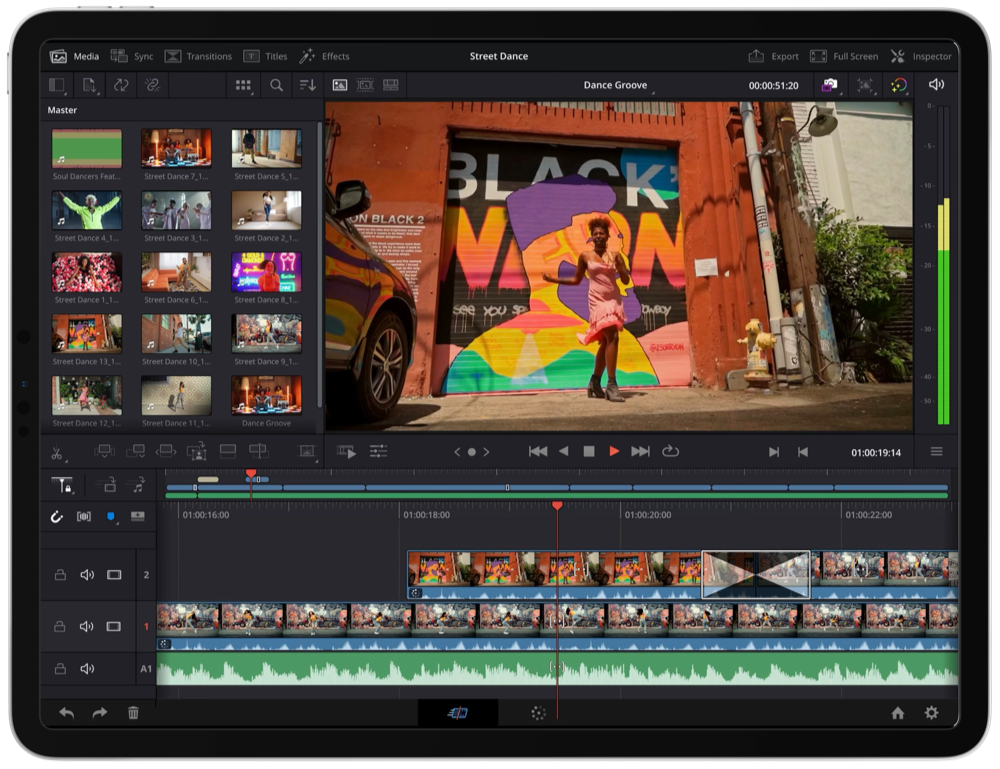
In terms of interface, the app is very similar to DaVinci Resolve 18 on the desktop. You can do basic tasks such as cropping videos, stitching them together and editing the audio as well as more advanced tasks such as color corrections and visual effects. The app also has all kinds of AI tools that use the DaVinci Neural Engine. You can use it to highlight people in a shot and adjust the background. You can also automatically adjust the aspect ratios, so that only the action is beautifully highlighted. And if you want to make a vertical version of your video for Instagram or TikTok, for example, the app will help you with that too. Finally, thanks to machine learning, you can filter out the audio of unwanted background noise.
The app works with Blackmagic Cloud Collaboration, the creator's cloud options. You can collaborate with other users and save your projects securely in the cloud. Multiple users can work on the same project at the same time and each change is shown in a separate view that you can then approve. You may know Blackmagic from the eGPU’s.


The app therefore comes into its own on the M2 and M1 models of the iPad, thanks to the extra computing power and extra RAM. Older models have fewer options and are limited to HD quality in terms of resolution, for example. All projects you create with DaVinci Resolve for iPad are compatible with DaVinci Resolve 18 for the desktop. The app works with a variety of file formats, including H.264, H.265, Apple ProRes, and Blackmagic RAW. If you have a Magic Keyboard or Apple Pencil, you can also use additional options. Finally, the app is optimized for Apple's external screens, the Pro Display XDR and Studio Display. To download the app you need at least iPadOS 16.