
Turn off the iPhone camera shutter sound so as not to disturb others while taking selfies and other photos. There are three ways to turn off the camera sound on the iPhone and iPad… except when you're in Japan or Korea. We also explain why that is.
Is the shutter sound too loud?
Not everyone likes to hear a clearly audible shutter sound when you take a photo with the iPhone. Especially in museums, in churches, during commemorations and in public places, it can be more pleasant to switch off the camera sound, so that you do not disturb others. This is very simple to do, in three ways. Oddly enough, you won't find a switch for this in Settings > Camera or Hear and Feel, but you have to do it in a different way.
- Via mute button
- Via volume buttons
- Via Settings
Caution: A shutter sound is mandatory in some countries. This applies, for example, to Japan and Korea, where the camera sound must always be on. If you are visiting such a country, you should take this into account. The iPhones that Apple sells in Japan and Korea are therefore a special variant, where you cannot switch off the shutter sound.
#1 Switch off camera sound with the mute button
With the button on the side of the iPhone or iPad you can easily switch off the camera sound. This button is located on the left side of the iPhone and can be recognized by an orange color, as a sign that the mute function has been activated. Keep in mind that this will also mute incoming calls and notifications, so it's best to turn off the mute switch after taking the photos. The orange color will then no longer be visible.

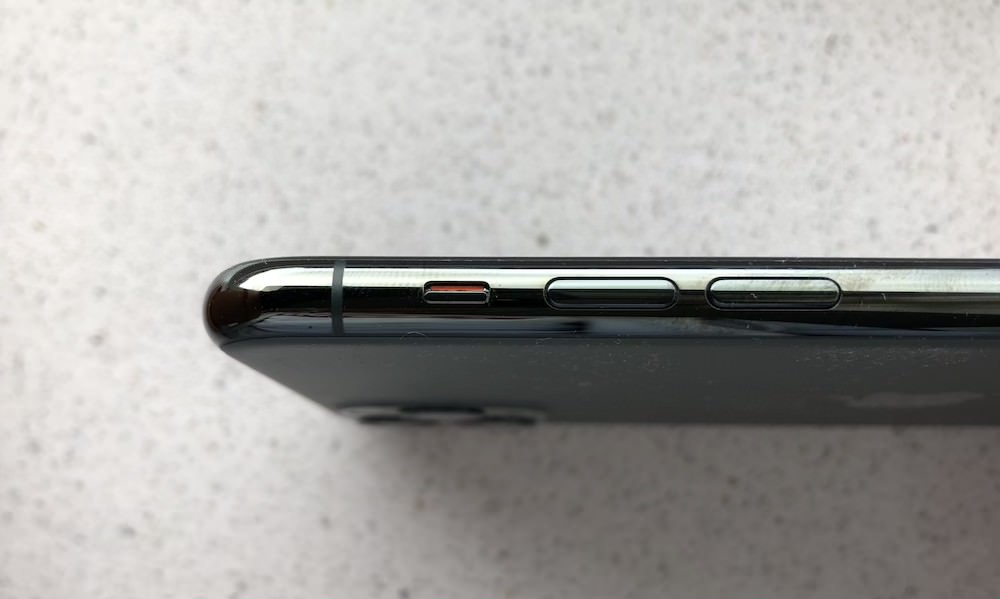

Some iPads no longer have this mute button. You must therefore turn off the sound via the Control Panel. Open Control Center and tap the bell to mute your iPad. In addition to the camera sound, this also applies to notifications and calls.
#2 Disable shutter sound with volume buttons
You can also use the iPhone or iPad volume buttons to mute the shutter sound. It's best to do this before opening the Camera app, as the volume down button has a different function in the Camera app. You can also take photos with it, so you don't have to tap the screen. So adjust the volume before taking photos. Please note that the option Change with buttons in Settings > Sounds/Hear and feel on.
#3 Disable camera sound via the settings
A third way is to disable the sound via the settings:
- Open the Settings app on your iPhone or iPad.
- Go to Hearing & Touch.
- Move the slider under Ringtone and notifications all the way to the left.

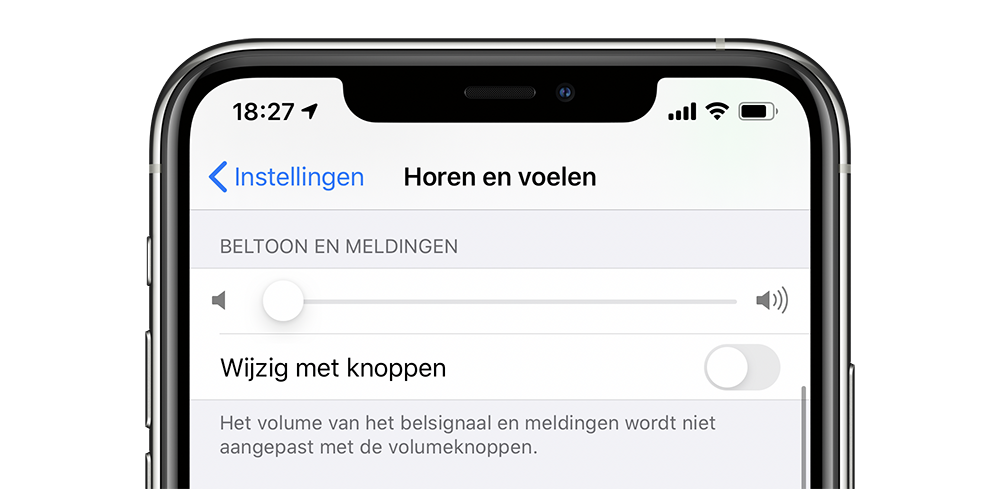

If you want to turn the camera sound back on, you have to pay attention to two things: the slider should be slightly to the right and the mute button on the side button of your device should not be set to orange.
More tips for the iPhone camera can be found here:
- Use iPhone as a camera for your Mac
- How to use the bubble level in the Camera app for photos from above
- How to set another camera app as the default camera on iPhone
See also 


How to set another camera app as default camera on iPhone
Think the default Camera app on your iPhone is too simple? Then with a smart trick you can 'replace' the default app with another camera app. In this tip we explain how to do that.